
How to Fix Shopify's New Pixel Default Before It Breaks Your Data

On January 13, 2026, Shopify announced a change to how they are handling customer events for the various tracking pixels on your site.
From the Shopify Changelog Blog:
In order to protect your store from accidentally oversharing data, Shopify will soon default to automatic data sharing optimization that monitors your marketing pixels and only shares data with tools that are driving results for your store. We see many pixels that haven’t sent traffic or sales to a merchant in weeks, months, or even years, and this feature is designed to protect your store from that exact situation if you forget to turn off sharing with inactive tools.
While it sounds innocuous, Shopify is walking a tightrope between protecting your data and breaking the tools you use to track customer interactions with your site. And I am not comfortable with their choice for the new default.
If you visit Settings > Customer Events, you will find the controls for this new setting:
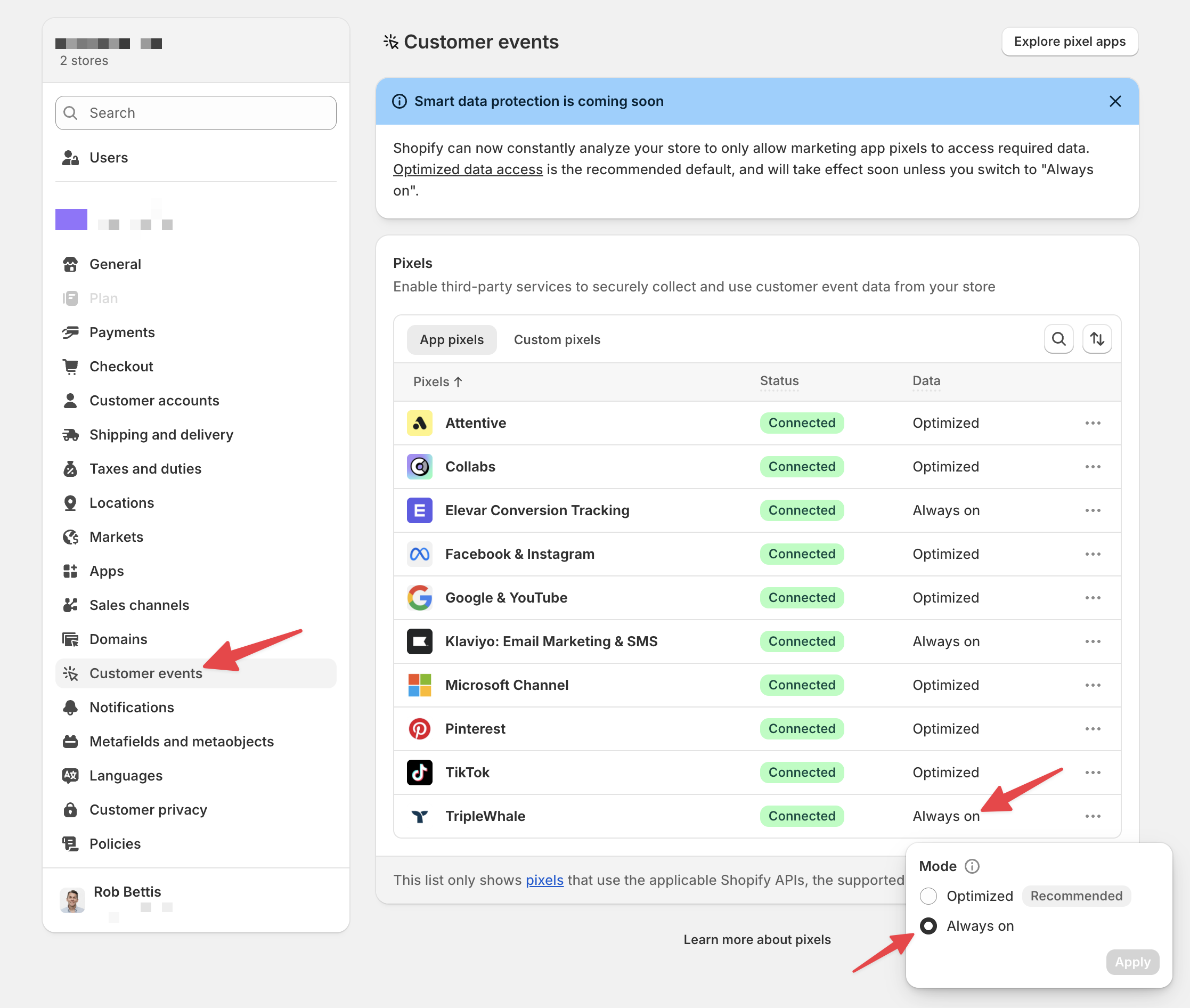
You will also now see a list of the various apps that leverage event tracking, each with a new default setting: "Optimized."
By set to "Optimized" Shopify can disable that tracking pixel when they see fit, based on some vague criteria:
We will look at multiple signals, including traffic and sales, to determine if sharing data back to a specific tool is helpful for your business. When we see zero signals coming from a pixel over days or weeks, we will pause data sharing until we see new signals, at which point data sharing turns back on.
"Days or weeks"...that's a big difference!
And how will this work for tools like Triple Whale's Sonar Send, which serves in a fall-back role, collecting customer activity missed by other tools, like Klaviyo's pixel? That remains unclear. However, in my opinion, that data is too valuable to leave to chance.
For this reason, I would recommend any Shopify store owner to take the following steps:
- revisit this list, removing any pixels that are no longer needed/relevant
- Identify the high-priority pixels - those you are reliant on.
- Set the mode of the high-priority pixels to "Always on."
While I don't see any harm in moving all pixels to "Always on," (I mean, you installed the app, right?!) you can optionally leave any non-high-priority pixels to the default "Optimized" mode.
This is an interesting move from Shopify. One that makes me wonder if Shopify is preparing the way for a new feature or service that will compete with services like Elevar. After all, Shopify is an investor in Triple Whale, too. Just speculation.
But for now, we can take the responsible action to preserve our data.
And as they say...watch this space. 👀